Building a partial-copy sandbox pipeline with Node and the Salesforce CLI
Most Salesforce teams solve the sandbox-data problem one of two ways: they leave dev sandboxes empty and ask engineers to click together test data by hand, or they wait on a full sandbox refresh that’s slow, expensive, and still a snapshot of the whole org rather than the specific records someone needs to look at. Neither holds up once you’re trying to reproduce a production issue that depends on real transaction history.
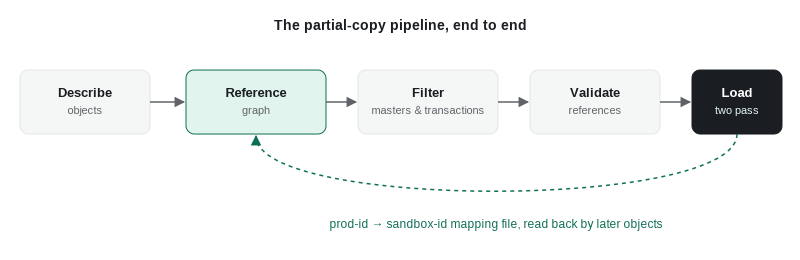
This is the pattern I use instead: a partial-copy pipeline that pulls a representative, filtered slice of production data — full reference (“master”) data plus a targeted set of transaction records — into a sandbox, with enough validation built in that the load runs largely unattended. It’s Node scripts driving the Salesforce CLI, not a packaged tool, which is exactly what makes it easy to adapt per org.
Start from the object describe, not a spreadsheet
The temptation is to hand-write SOQL for every object you need to export. That falls apart fast — every schema change means going back and editing queries, and it’s easy to miss a reference field that didn’t exist last time you looked.
Instead, pull the object describe for everything in scope and generate queries from it:
const describe = await getObjectDescribe(targetOrg, objectName);

const createableFields = describe.fields.filter((f) => f.createable);
const referenceFields = createableFields.filter((f) => f.type === "reference");
const plainFields = createableFields.filter((f) => f.type !== "reference");
Two fields always get added back in even though they aren’t “createable” in the API sense — Id
and CreatedById — because the load process needs them later for record-type and ownership
mapping. Record type references get swapped from RecordTypeId to RecordType.Name, since record
type IDs may not survive between orgs but developer names do.
Build the reference graph before you load anything
Before writing a single load script, generate a map of every object’s reference fields, which of
those references have a usable external ID on the parent, and how many records are actually
populated for each. This becomes the backbone of the whole pipeline — later steps use it to decide
whether to insert or upsert, which fields need record-ID remapping, and where self-references
will need special handling.
A record in that map looks roughly like this:
{
  "sObject": "Order__c",
  "recordCount": 340,
  "referenceFields": [
    { "name": "Account__c", "referenceTo": "Account", "externalIdRef": "Account__r.External_Id__c", "populatedCount": 340 },
    { "name": "ParentOrder__c", "referenceTo": "Order__c", "populatedCount": 12, "selfReference": true }
  ]
}
Generating this costs almost nothing — it’s just describe calls plus a pass over the exported CSVs — but it tells you up front which objects are going to be awkward (self-references, no external ID, heavily populated user-lookup fields) before you’ve written any load code around them.
Filter masters by scope, transactions by a set of anchor records
Large reference objects get filtered the same way regardless of org: pick a scoping dimension that naturally bounds the data (a region, a branch list, a set of states) and filter every master object that rolls up to it. That gets the “master” side of the copy down to a manageable size while keeping it internally consistent — a filtered price book doesn’t help if the accounts that reference it got filtered out by a different rule.
Transaction objects are filtered differently: pick a small set of anchor records (in my case, a handful of opportunity names chosen to cover a spread of stages and account types) and then walk the reference path from each transaction object back to that anchor:
// Anchor: Opportunity.Name IN (...)
// Via:    Order__c -> Opportunity__c -> (direct)
// Produces something like:
//   SELECT ... FROM Order__c WHERE Opportunity__c.Name IN ('ANCHOR-1', 'ANCHOR-2')
Every transaction object in scope declares its own anchor path (direct reference, or a chain through an intermediate object) in a config file, so adding a new transaction object to the load is a one-line addition, not a new script.
Validate before you load, not after it fails
The single biggest time-saver in this pattern is refusing to find out about broken references at
load time. Before importing anything, enumerate every user reference (CreatedById, OwnerId,
and any custom user lookups) and every non-user reference across the extracted files, and check
each one against what already exists in the target org:
- User references: is this user present in the sandbox, and active? If not, that’s a fixable gap — either load a minimal set of users first, or swap the reference for an integration user — but you want to know about it before the bulk load starts failing one row at a time.
- Non-user references: does the parent record this row points to actually exist in what you’re about to load? A reference to a record you decided to filter out upstream is a real bug in your filtering, and you want to catch it at this stage, not as a cascade of partial failures three objects deep.
This step produces a report, not a blocker — you fix what it finds, then load.
Self-referencing objects need two passes
A handful of objects reference themselves — a parent/child hierarchy within the same object, for example. Bulk-loading these in one pass doesn’t work: on insert, the “child” row’s parent doesn’t have a sandbox ID yet, because it hasn’t been created.
The fix, assuming the hierarchy is only two levels deep and fully contained within what you exported: split the file in two. Pass one inserts every record with an empty self-lookup field. Pass two takes the records that do have a populated self-lookup, remaps it from the production ID to the sandbox ID that pass one just created, and inserts those.
const [withoutParent, withParent] = partitionBy(records, (r) => r[selfLookupField] === "");

await bulkInsert(objectName, withoutParent); // pass 1 — establishes sandbox IDs for these rows
// ...save the prod-id -> sandbox-id mapping from the pass 1 results...
await bulkInsert(objectName, remapIds(withParent, selfLookupField, mapping)); // pass 2 — inserts the rest
One mapping file ties the whole load together
Every object that gets inserted (rather than upserted by external ID) writes its production-ID to sandbox-ID mapping into one running file as it loads. Every subsequent object that references it reads that file to resolve its own lookups before loading. That one file is what lets a long, dependency-ordered load run without a human manually copying IDs between steps — as long as the load order respects the dependency graph you built earlier, each object’s parents are already mapped by the time it loads.
What this buys you
None of this is complicated in isolation — describe calls, a dependency-ordered load list, two passes for self-references. The value is in doing it as a repeatable, config-driven process instead of a one-off script per sandbox refresh: add an object to a CSV, and the describe step, the query generation, the reference validation, and the load ordering all pick it up automatically. That’s what turns “we need a sandbox with real data in it” from a multi-day manual exercise into something you can run with a config change and an afternoon.
If your team is stuck between empty dev sandboxes and slow, expensive full-copy refreshes, let’s talk about your setup.